
Unity / August 30, 2022
RPG Builder Mod: Creating Reusable Patrol Path Prefabs
A Unity RPG Builder mod that assigns spawned NPCs to the nearest tagged patrol path so patrol paths can be reused as prefabs.
Updated September 14, 2022
Introduction
In case you aren't familiar with Patrol Paths in RPGB, here's quickly how they work.
-
You create a game object in the scene and assign a
PatrolPathscript to it. From there you can add Points for your AI to patrol. -
Next you need to configure a
PatrolTemplateand configure your AI in RPGB so it uses the Patrol state logic. Once that's all done it will spawn, go on patrol, and be happy.
Behind the scenes, in order for your NPC to find the PatrolPath you created,
there is
GameObject.Find("...")
code that will load the first instance of a PatrolPath in your game scene that
matches the name you assigned to the PatrolPathName field in the template.
But there is a lingering problem for me with just this default behavior. If you don't use a
unique name for the PatrolPath you put in the scene, the
GameObject.Find("...") will only ever pull one PatrolPath, and so
all the mobs who share a PatrolPath with that name will go down the same path.
Now's a good time to watch a video so you can see what I mean in action:
The expected approach designed in RPGB is to use unique names for PatrolPaths. That's a good idea if there are only a few patrol paths in your game. But if you want to put hundreds or thousands of patrol paths down you will need to create a template for each one, and also maintain unique names for all of them. That happens to be my use case. What I'm doing is maintaining a set of RPGB AI templates, and don't want to duplicate them for just a naming difference between PatrolPaths.
So here's my approach:
- Tag the
PatrolPathgame object. I called the tagNPCPatrolPath. -
In the
AIStatePatrol.csscript you do a few things:- Get all the tagged PatrolPaths and put them in a
PatrolPathsArray. -
Get the distance between the newly spawned
AIEntityand all of the tagged GameObjects in thePatrolPathsArray. - Get the closest
PatrolPathand assign it to theAIEntity.
- Get all the tagged PatrolPaths and put them in a
As long as your NPC spawns on top of the first patrol point you want them to start patrolling from, this approach will work. You can achieve this by putting the Starting Point and PatrolPath on top of each other in the prefab. You can see how I structured my prefab in the screenshot below.
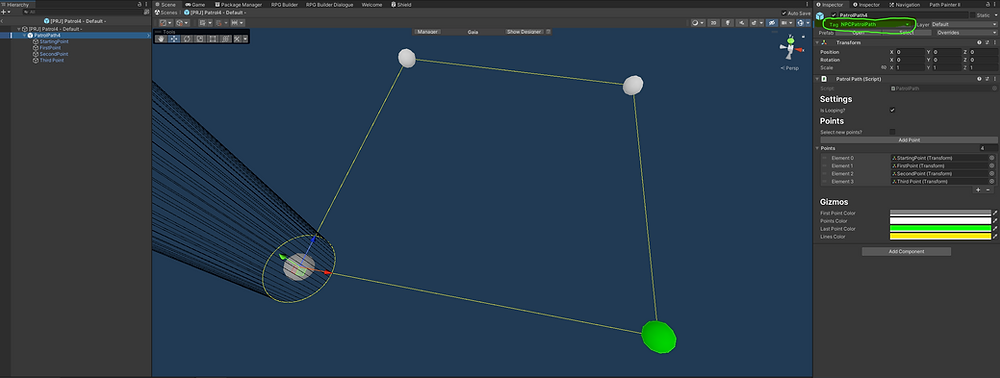
In this post I didn't implement the Random PatrolPath component available in
the PatrolTemplate. At the end of this post there's a link to the code that
implements the Random component.
Note: You won't be able to follow along with this post unless you already own a copy of RPG Builder.
As always, backup and version control your projects before modding them.
Disclaimer: There is no guarantee or future support offered regarding these changes. I tested them out at the time I wrote them, and they worked within the scope of my needs. However, I am not the author of RPGB and therefore am not the authoritative source on whether these mods are complete. Use at your own risk. Reach out to me on Discord if you have any thoughts or suggestions about this mod.
Modded RPGB v2.0.6. New code additions are always highlighted in green, whilst RPGB code is always highlighted in blue.
Mod AIStatePatrol.cs
We're using LINQ so first include the proper using statement at the top of the file:
using System.Linq;Next, inside the Initialize() method we replace these lines:
... (inside the Initialize() method around line 33)
patrolPath = patrolTemplate.RandomPath ? GameObject.Find(patrolTemplate.PatrolPathNames[Random.Range(0, patrolTemplate.PatrolPathNames.Count)]).GetComponent<PatrolPath>()
: GameObject.Find(patrolTemplate.PatrolPathName).GetComponent<PatrolPath>();
...
With these:
var patrolPathArray = GameObject.FindGameObjectsWithTag("NPCPatrolPath");
float[] patrolPathDistances = new float[patrolPathArray.Length];
for (int i = 0; i < patrolPathDistances.Length; i++)
{
    patrolPathDistances[i] = Vector3.Distance(ThisAIEntity.transform.position,
        patrolPathArray[i].transform.position);
}
if (patrolPathArray.Length == 0)
{
    // Invoke RPGB default if no patrols are tagged and notify the console
    Debug.Log("You didn't tag any patrol paths in this scene. Using default behavior.");
    patrolPath = patrolTemplate.RandomPath ? GameObject.Find(patrolTemplate.PatrolPathNames[Random.Range(0, patrolTemplate.PatrolPathNames.Count)]).GetComponent<PatrolPath>()
        : GameObject.Find(patrolTemplate.PatrolPathName).GetComponent<PatrolPath>();
}
else
{
    var closestPatrolPathIndex = Array.IndexOf(patrolPathDistances, patrolPathDistances.Min());
    patrolPath = patrolTemplate.RandomPath ? GameObject.Find(patrolTemplate.PatrolPathNames[Random.Range(0, patrolTemplate.PatrolPathNames.Count)]).GetComponent<PatrolPath>()
        : patrolPathArray[closestPatrolPathIndex].GetComponent<PatrolPath>();
}
The End
With this mod you can create prefabs out of Patrol Paths, something that would be hard to manage without using the tag-based approach outlined here.
If you liked this mod, then check out how to add randomness in the next post.